Just because you’re on vacation doesn’t mean you have to go completely off the grid – unless that’s the whole point, in which case, carry on!
But, if, like most of us, you need to check emails or just want to share photos with friends back home, you’ll be happy to know that WiFi in Iceland is pretty much everywhere!
From hotspots to SIM cards, there are options for you to stay connected to the internet in Iceland.
While I go over the WiFi options in this post, just so you know, after trying them all, one eSIM company came out as the clear winner. Click 👉 here to jump to my top recommendation.
Let’s get into it!
Table of Contents:
How to Get WiFi in Iceland
You might be wondering: Does Iceland have good internet?
Surprisingly, yes.
We’ve got strong WiFi in most places, and I’ve honestly never had a problem staying connected.
That said, some areas are remote, so having reliable internet is so important!
You’ll need it for staying in touch, using navigation apps, and checking road and weather conditions on the go.
Here are a few ways to stay connected while you’re in Iceland:
1. Free Public WiFi Hotspot, Iceland
Free WiFi is pretty much everywhere in Reykjavík and other Icelandic cities.
Whether you’re hanging out at a café, restaurant, or bar, or even relaxing at a public swimming pool, chances are you’ll find reliable WiFi nearby.
Hotels and guesthouses usually offer free WiFi, so staying online in town is easy and convenient.
Pros
- Free WiFi networks are widely accessible across the capital and other Icelandic cities.
- You don’t have to worry about buying SIM cards or paying for data plans while you’re in the city.
Cons
- Public WiFi can be less secure. Avoid accessing sensitive info or banking sites on these networks.
- Limited coverage outside cities, so you can’t rely on it for navigation or emergencies.
That’s why if you’re road-tripping through Iceland, especially into the remote areas, having a reliable digital map is a game-changer.
I created my Iceland Map + Guidebook to help with exactly that.
It’s full of handpicked hidden gems, must-know spots like gas stations and clinics, and iconic sites all pinned on a digital map.
It’s designed to make your Iceland road trip easier and way more fun!
2. International Plan with Your Domestic Cell Phone Provider
You can also secure WiFi in Iceland by setting up an international plan with your home cell phone provider.
It’s pretty straightforward – just call them up and let them know which dates you’ll be in Iceland so they can set up international coverage.
The nice thing about this option is that it’s easy to stay in touch with your cell phone provider. Especially if you have questions about your bill or need to sort out any data overages
The downside of this option is that it can get very expensive!
You’ll likely have to pay per line, per day, so each person would need their own coverage – unless you’re all relying on one phone during the trip (also not ideal).
Another drawback?
You might be limited when it comes to things like data, calls, texts, and gigabytes for internet use.
And those can disappear fast, especially if you’re in Iceland for more than a few days!
Pros
- Simple to set up. Just call the cell phone provider to switch it over.
- Can easily call with questions about your bill.
Cons
- Expensive depending on what provider you use, etc.
- Could be limited on data/calls/text.
Keeping your roaming charges in check is one way to stick to your budget. If you’re looking for more ways to save on your trip, check out this blog post.👇
➡️ READ: How to Travel Iceland on a Budget: 25 Tips to Save Money on Your Trip
3. Buy a Prepaid Icelandic SIM Card
The next option is to buy an Icelandic SIM card when you arrive.
All you have to do is pop open the SIM card slot on your phone (using that tiny tool or even a paperclip), take out your regular SIM, and swap in the prepaid SIM card for Iceland.
Easy peasy!
You’re instantly connected to the internet, and you can go and travel around the country.
Another benefit of going this route is that it’s usually pretty cost-effective.
You’ll want to compare prices and consider how much data you need to load onto the SIM card, but in general, it’s cheaper than an international plan, which, don’t forget, usually charges per line per day.
The downside is that it’s one more stop to make before you’re officially on holiday. And if you’re traveling with others and everyone wants access, you’ll need one SIM per person, per phone.
That’s when the costs can start adding up.
Pro Tip: Before you swap SIM cards, double-check that your phone is unlocked. Some carriers lock their devices, so you can’t use another provider’s network.
Where to Find Prepaid SIM Cards
There are a couple of different ways that you can get the best prepaid SIM cards in Iceland.
Icelandair: I know that Icelandair sells them on board, but they are subject to availability.
Purchase one at 1011: Once you arrive at the airport and clear customs, you’ll enter the arrival Hall. You’ll see a 1011 on the right-hand side where you can buy a SIM.
Duty-free: You can also pick up an Icelandic SIM card at the duty-free.
Pros
- Simple to use, just swap it out with your current SIM card and you’re ready to go.
- Great coverage.
Cons
- Another thing to do/stop to make before you get started on your journey.
- Can’t use it if your provider has “locked” your phone.
Need help figuring out what to do once you land in Iceland?
I’ve got a FREE Iceland Arrival Guide with your name on it! 😉
I’ll walk you through exactly where to go, step by step.
You’ll even get a heads-up on how long passport control and customs usually take, so nothing catches you off guard.
Oh, and there are some exclusive VIP discounts in there too! 👏
Drop your email and I’ll send the FREE Iceland Arrival Guide right to your inbox!
4. Get WiFi in Iceland Through Your Car Rental Company
The next way to stay connected in Iceland is through your rental car company.
WiFi is usually built right into the vehicle, but sometimes they’ll give you a separate device.
Since you’re picking up your car anyway, it’s one less stop you have to make.
Win-win!
What’s nice is that it usually comes with unlimited data, so you don’t have to worry about overages.
This route is easy and convenient.
This route is easy and convenient, but there are a few things to keep in mind…
If you plan on joining tours, using public transport or taking the Flybus to Reykjavík, you won’t be renting a car – so this option is not for you.
Also, if the WiFi is built into the vehicle, it’s not a portable WiFi in Iceland solution. You won’t be able to take it with you on a hike, into a restaurant, or anywhere else you leave the car.
As luck would have it, the second you leave the car is exactly when you’ll need to Google something, message a friend or check a trail map… and of course, you’re offline!
That’s why having WiFi access everywhere is non-negotiable when you’re in Iceland.
Make sure to check with the rental company whether the WiFi is a separate modem or just built into the dashboard system. That way, you’ll know what to expect.
Psst… If you’re camping on your trip, Happy Campers’ vans come with unlimited WiFi that supports up to five devices.
They’re the original camper van company in Iceland, and their camper vans are fitted with everything you need: a built-in kitchen, cozy sleeping space, and even 4WD options so you can access those off-the-beaten-path places.
Get a 10% discount on your Happy Campers van rental when you book with my code: IWV10
Pros
- WiFi can already be built into the vehicle.
- It’s convenient as you’ll be picking up a rental car anyway.
Cons
- Could have a limited amount of data.
- Service might be unreliable.
- Usually not portable.
Got questions about renting a car in Iceland? Here’s the information you need.👇
➡️ READ: Renting A Car In Iceland: 10 Quick Tips For A Successful Trip
5. Rent Pocket WiFi in Iceland
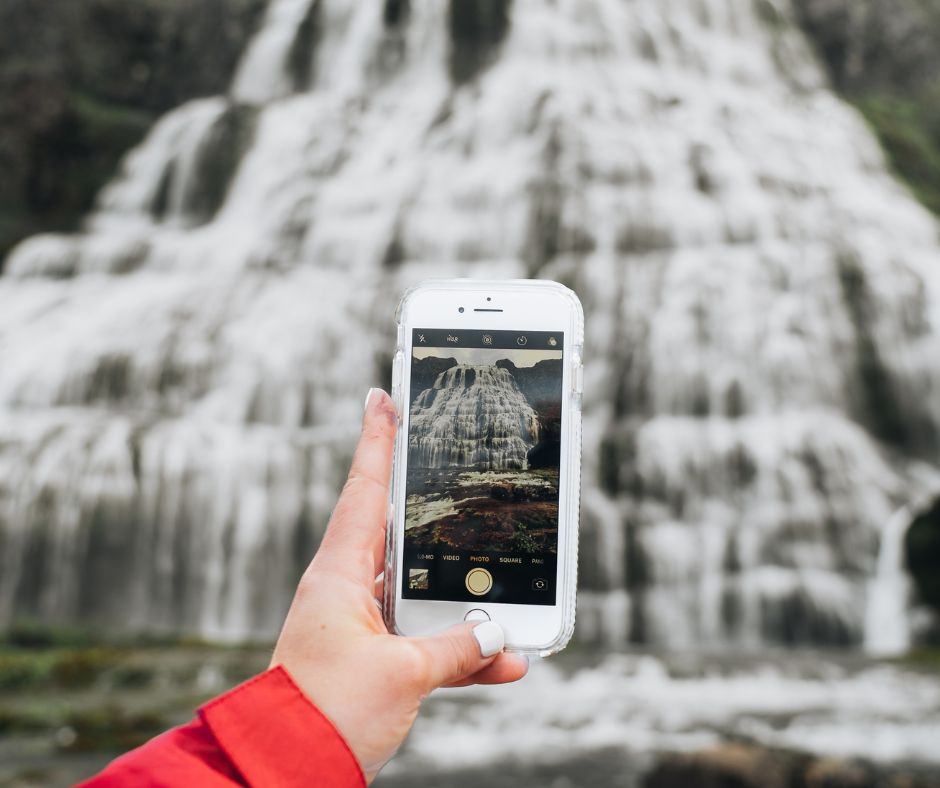
Okay, so what is pocket WiFi exactly?
It’s a small portable modem you can rent that acts like a mobile hotspot.
You can connect multiple devices at once – cell phones, tablets, and even laptops at the same time.
You’ll usually pick it up at the airport or have it delivered to your hotel, and most companies offer unlimited or high-data packages.
Just keep in mind that it needs to be charged regularly and returned at the end of your trip, so it’s one more thing to manage while you’re traveling.
Pros
- You get a portable internet connection almost anywhere.
- Many providers offer unlimited data or large data bundles, so you don’t have to stress about overages or surprise fees.
Cons
- One more thing to pick up, return, and carry around.
- It needs to be charged regularly.
- While cheaper than roaming, it’s still a daily rental fee, so for longer trips, the cost can add up compared to a local SIM or eSIM.
6. Get WiFi in Iceland with an eSIM Plan
Okay, I need a drumroll, please! 🙌
Now I’ve tried a few different ways to stay connected while traveling, and lately I’ve been using KnowRoaming eSIMs, and so far it’s my favorite!
If you don’t want to deal with physical SIM cards, airport kiosks, or patchy WiFi, this is by far the most seamless option.
Using an eSIM for Iceland has made the entire process of staying connected so easy.
How Does it Work?
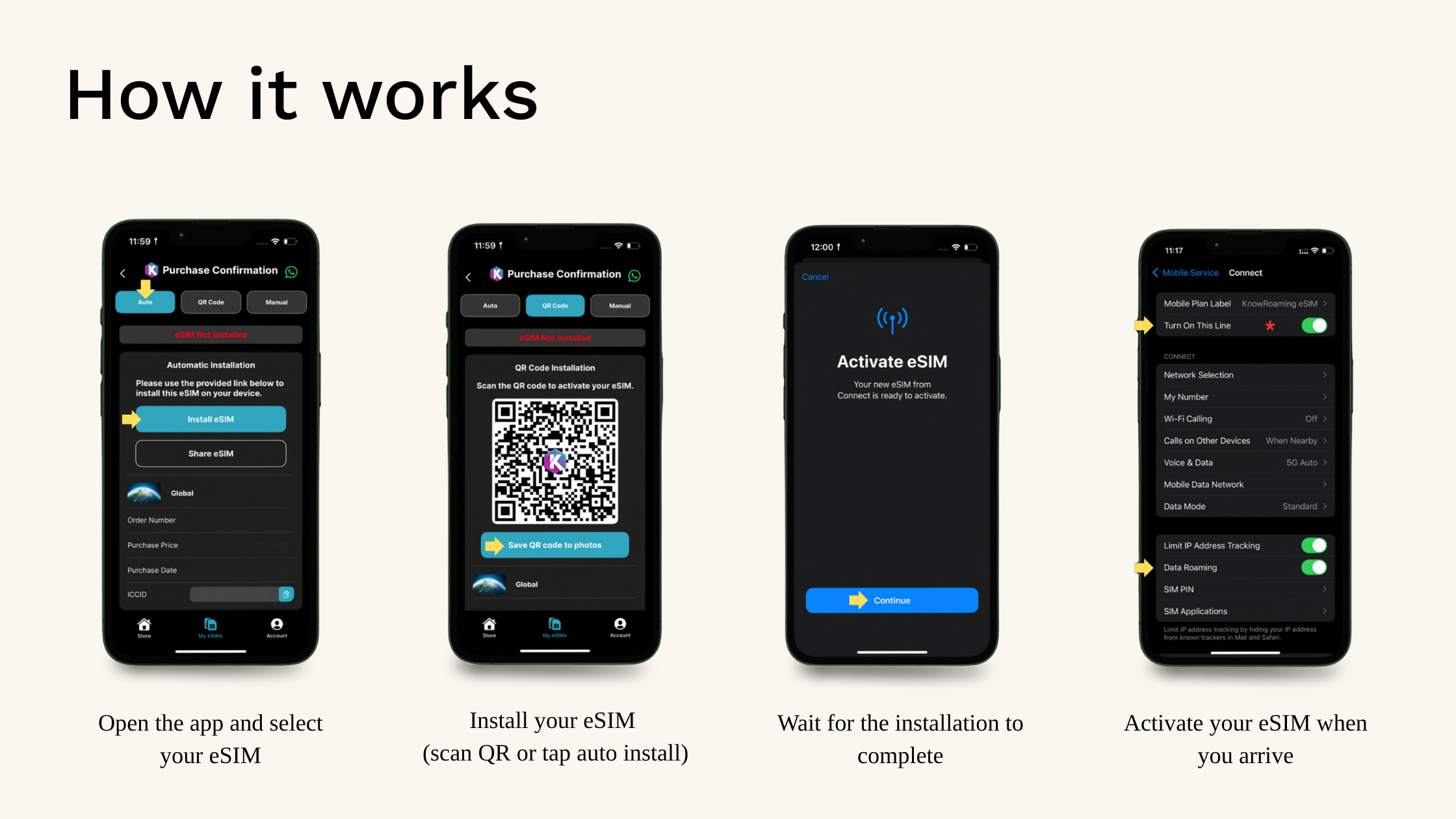
Setup is super quick, and the best part is, everything is done digitally. No swapping SIM cards, no extra devices, no stress.
Step 1: Download the app
Start by downloading the KnowRoaming app and creating your account. Remember to accept the notification prompt, I’ve been getting discount offers and reminders on eSIM data usage, on the go!
Step 2: Choose your destination and plan
Search for your destination and pick a data plan based on how long you’re staying and how much data you’ll use.
They’ve got a range of unlimited and fixed plans, so you’re not stuck overpaying for something you don’t need. Plus, their auto top-up feature ensures you never lose connectivity if you activate it.
Step 3: Install your eSIM
Once you’ve purchased, go to My eSIMs in the app and follow the install steps.
Follow the prompts to install the eSIM on your device. Installation may take a few minutes.
Step 4: Activate when you land
When you arrive, go to your phone’s Mobile/Cellular settings, turn on your eSIM line, make sure mobile data is set to the eSIM, and enable data roaming.
That’s it, you’re connected and you can use all your regular apps like Google Maps and WhatsApp, and you’ll have internet as soon as you land.
No queues, no searching for WiFi, just instant data.
Why I’ve been using this
What I like about KnowRoaming is that it just works without overthinking it.
- You can install everything before your trip and land already connected
- No need to remove your home SIM (so you still get messages, banking codes, etc.)
- Their plans are well-priced for the amount of data you get
- All their eSIM plans come hotspot-ready.
- 24/7 support if anything goes wrong (which is rare, but good to know)
A couple of things to know
- Not all phones support eSIM, so double check your device before purchasing. KnowRoaming have a compatibility checker directly on the plans page as well as the home page – try it out before purchasing.
- Make sure you install it before you travel for the smoothest experience.
Click here to download and get connected in Iceland.
As you can see, staying connected to the Wifi in Iceland doesn’t have to be complicated.
However, some ways are far better than others!
If you want a simple, stress-free way to stay connected in Iceland, using an eSIM is hard to beat.
Just set it. Forget it. And enjoy Iceland. 💚
Happy Planning,

Pin it for later!